Settings
 Gift Card
 Blog
 Locate Us
 Partnership

How to Contact Your Private Chef Before Your Booking (And What to Say)
Key Takeaways
- You can message your chef through the CookinGenie dashboard as soon as your booking is confirmed.
- CookinGenie chef communication happens by chat or secure calling right after you book.
- Confirm the menu with your private chef, along with allergies and arrival time.
- If replies are slow, a friendly follow-up or a call to support helps.
Booking a private chef for the first time brings a lovely kind of anticipation, with the date on the calendar, the guest list settled, and only the evening itself left to look forward to. Somewhere between checkout and the first knock on the door, most first-time hosts start wondering how much they can share with their chef in advance and whether reaching out early is welcome.
It absolutely is, and a few well-timed messages are the simplest way to make the night feel effortless.
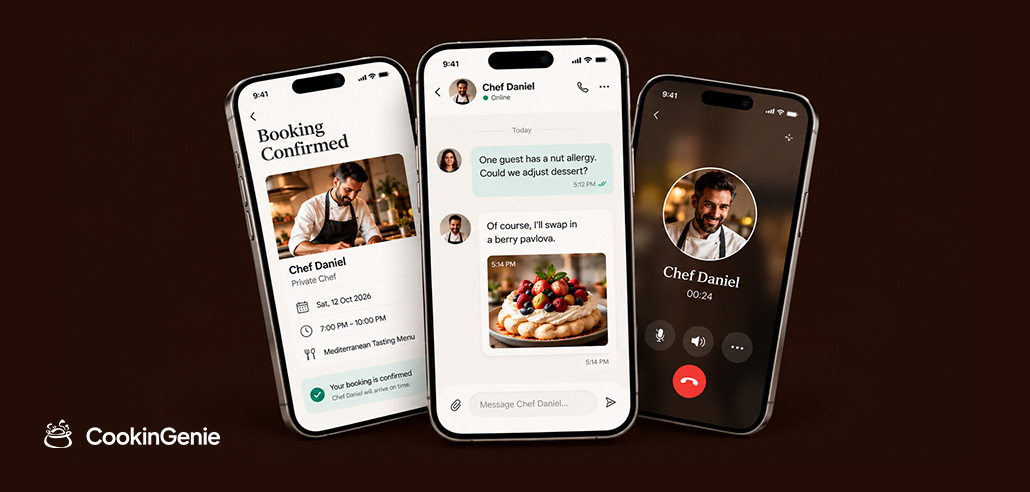
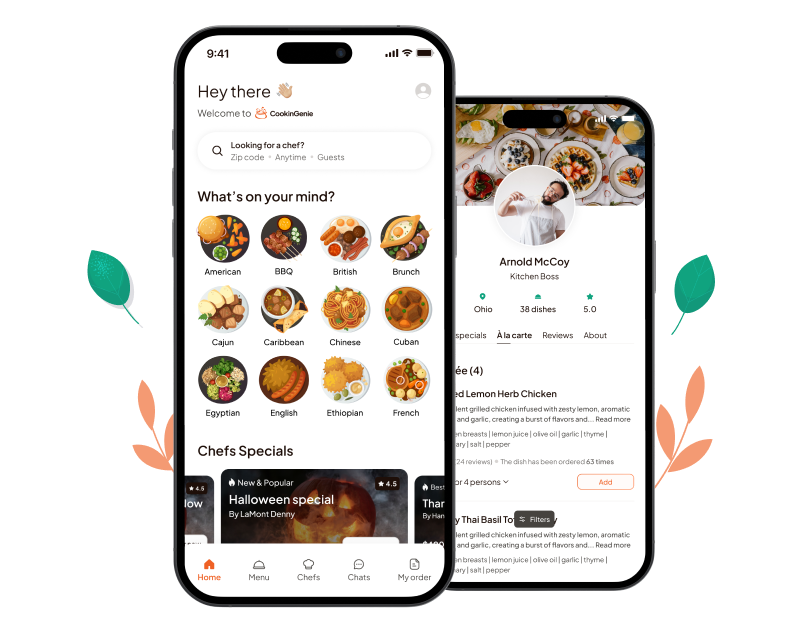
You can contact your chef through the CookinGenie dashboard as soon as your booking is confirmed, giving you time to discuss the details before the service date. A confirmation email and SMS arrive with your order details, and then CookinGenie chef communication happens in two ways.
The chat on the app works beautifully for menu notes, allergy details, and anything you would like in writing, while secure calling suits a quick conversation about timing or kitchen setup.
How to message a chef before dinner in four steps
- Open your booking. Sign in to CookinGenie and open your upcoming booking.
- Find your assigned chef. Your booking details show that the chef is confirmed for your date, along with your menu and event time.
- Choose how you’d like to connect. Use chat for written details or secure calling when you’d prefer to speak with your chef directly.
- Send your first message. Introduce yourself, confirm the occasion and guest count, and share any allergies or dietary needs.
A small tip: Turn on app notifications so your chef’s replies reach you right away, since chat messages are easy to miss when alerts are off.
When to reach out and what to cover
Breaking the conversation into a few stages after booking keeps each message short and gives your chef room to plan.
Right after booking
A warm introduction within a day or two of confirming sets the tone. Share the occasion, the number of guests, and the mood you have in mind, whether that is a relaxed family dinner or a polished celebration.
- Is there anything about the occasion that would help you plan the menu?
- How would you suggest pacing the courses for our group?
About a week before
This is the ideal moment to confirm the menu with your private chef. Walk through each course, ask about seasonal swaps, and agree on portion sizes for your table.
- Could you adjust any course to make the most of what is in season?
- Are there ingredients you would recommend swapping for our guests?
A few days before
Dietary restrictions and allergies deserve their own dedicated message. Name each allergy clearly, identify which guest it affects, and repeat those details in the special-instructions section of your booking.
This is also the ideal moment to mention your kitchen layout and setup details. Private chefs frequently note that while hosts remember dietary needs, they often forget the quirks of basic kitchen equipment until the chef arrives.
When messaging your chef, take a moment to highlight:
- Cooktop Type: Mention if you have an induction stove so the chef can bring compatible cookware.
- Oven & Prep Space: Note if your oven runs hot/cold or if counter prep space is limited.
- Specialized Utensils: Let your chef know if you prefer them to bring specific pans, serving platters, or specialized utensils.
Sharing these small details alongside your occasion and dietary preferences gives your chef everything they need to prepare seamlessly before stepping into your kitchen.
The day before
A short check-in confirms that everything is in place.
Chefs typically arrive two to four hours ahead of the selected mealtime with all the groceries, depending on the menu and guest count. You can also confirm the arrival window, parking or building access, and the best number to reach you on the day of your dinner.
Easy first message you can try
Hi Chef [Name], we are so looking forward to dinner on [date]. There will be [number] guests celebrating [occasion]. One guest has a [severe or mild] [allergy], and another prefers vegetarian dishes. Could we confirm the final menu by [day], and could you share your planned arrival time? Please let me know if there is anything you need from the kitchen.
Warmly,
[Your name]
If your chef hasn’t replied yet
Reply times vary from chef to chef, since chefs are often prepping or cooking for other clients during the day.
A polite follow-up in the chat usually resolves a quiet thread, and secure calling is the natural next step when a question is time sensitive. The support team can also step in directly whenever a detail needs attention before your event.
Need help reaching your chef?
Call (833) 436-4387, email support@cookingenie.com, or send a note through the contact page.
Settle the details, then enjoy the evening
Taking a moment to message a chef before dinner is all it takes to arrive at the evening with nothing left to decide.
Open your booking, say hello to your chef, and let the conversation shape a menu built entirely around your table. For your first booking, explore chefs in your city and start planning the menu.
This guide is published by CookinGenie, where discerning hosts meet professional private chefs across the US, and reflects the insight of our chef community and guest services.
Frequently asked questions
Yes. Once your booking is confirmed, you can communicate with your assigned chef through CookinGenie using chat or secure calling. Before booking, direct communication with a chef isn’t available.
Add them to the special-instructions section, then confirm each detail with your chef in chat.
Send a follow-up or try secure calling, then contact support at (833) 436-4387 for help.






 Home
 Chefs
 Chats
 My Order